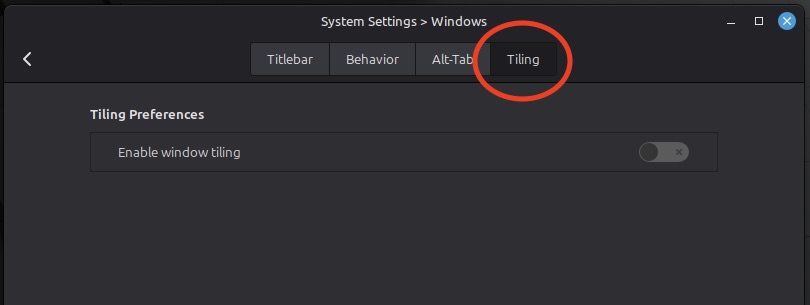
Search Hot Corners

Start with one corner. Don’t try to optimize everything at once. Too many new features at one time is a recipe for total confusion!
3. LocalSend: A Must-Have Tool
If you move files between devices (Linux, Mac, Windows, phone), this is one of the most useful tools you can install. I use it to send photos, files, and other data from the Linux machine to my iPad, Mac, or iPhone, and vice versa.
It works without an internet connection. You just have to be on the same wi-fi network.
How to install:
One of the things I love about Linux Mint is the ease of installing software. To install this, all you have to do is go to Menu → Software Manager and search for LocalSend. Once you find it, click the Install button, and you’re good to go.
LocalSend is so easy to operate. I tried to complicate things because I couldn’t believe how easy it was to use. Because LocalSend assigns silly names to each device, I chose to rename each device so I knew which was which. After changing the names, you must restart the app.
Common Issue: Devices Not Showing Up
If LocalSend can’t find your other devices, it’s usually not the app, it’s your firewall.
The fix:
- Open Firewall settings (I detail this in the above video)
- Add a new rule:
- Allow traffic
- Use the port listed in LocalSend’s advanced settings
- Apply in both directions
Once that’s done, everything should connect normally.
This is one of those problems that feels complicated, but it really isn’t once you see it.
4. Audio Problems: Codec Confusion
I had the frustration of recording something. It plays just fine on the Linux machine, but when I sent it to my Mac, and pressed play, I couldn’t hear a thing.
The problem was the codec. So, in my case, I switched the codec from MP3 to AAC, and it worked.
If you’re using OBS Studio or similar tools, check your audio settings. You don’t need to understand codecs deeply. Just know that if the audio doesn’t play, try a different format. You can always ask ChatGPT to help get you through.
5. Recent Files Clutter: Clean It Up
When searching for apps, Linux Mint may show a bunch of recent files along with your results. If you’re doing lots of test files (like recording videos), this gets messy quickly.
The fix:
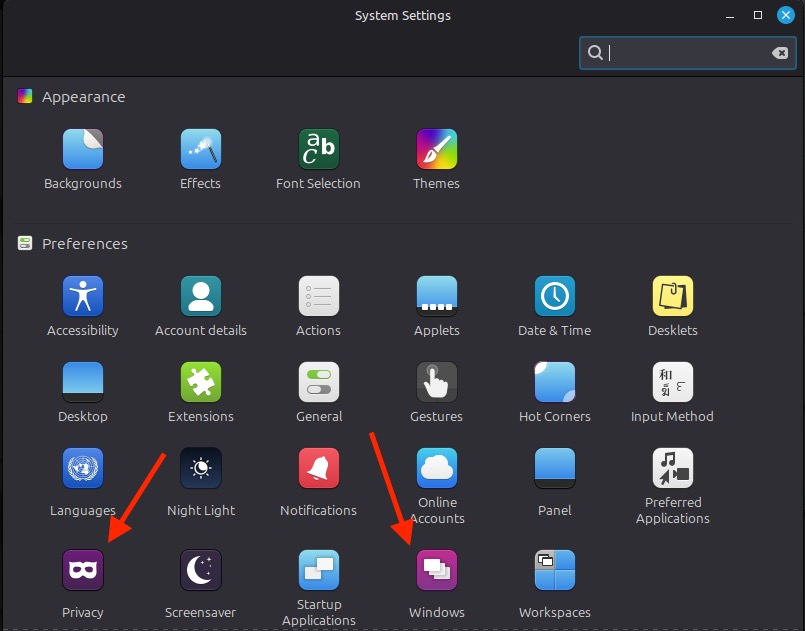
- Go to System Settings
- Click Privacy
- Turn off recently accessed files
- Clean, simple search results again.
The Bigger Picture
Here’s what I’ve concluded with my new dalliance into Linux. I’m not struggling with Linux Mint because it’s hard. I’m slowing down because I’m learning where things live and how they behave. It’s the learning curve, and I’m okay with it.
I find the fastest way forward isn’t trying to learn everything at once. This ol’ gal is learning Linux Mint one annoyance at a time. The more I use the system, the more I learn. And, of course, I document what I’ve learned for future reference. Eventually, it will become second nature.
Felicia (aka Low Tech Grandma) is a wife, mother, grandmother, freelance writer and low-tech blogger.
Last Modified: 29 October 2026